Introduction
Are you making these common Fiverr profile mistakes? Jab maine freelancing start ki thi, mujhe lagta tha ki sirf “Gig banana” hi kaafi hai. I thought if I had a skill, clients would automatically find me. But for months… silence. Koi order nahi, koi message nahi.
Main sochta tha, “Fiverr saturated hai” ya “Meri kismat kharab hai.”
But one day, maine realize kiya ki problem meri skill mein nahi, meri Profile Presentation mein thi. I was appearing like an amateur, aur clients amateur par trust nahi karte. Jab maine apni galtiyon ko rectify kiya aur profile update ki, toh results aane shuru ho gaye.
Aaj main aapke saath wahi experience share kar raha hoon. Here are 10 Common Fiverr Profile Mistakes jo naye Indian freelancers karte hain. Agar aap inhein fix kar lenge, toh clients aapko professional samjhenge, na ki fake.
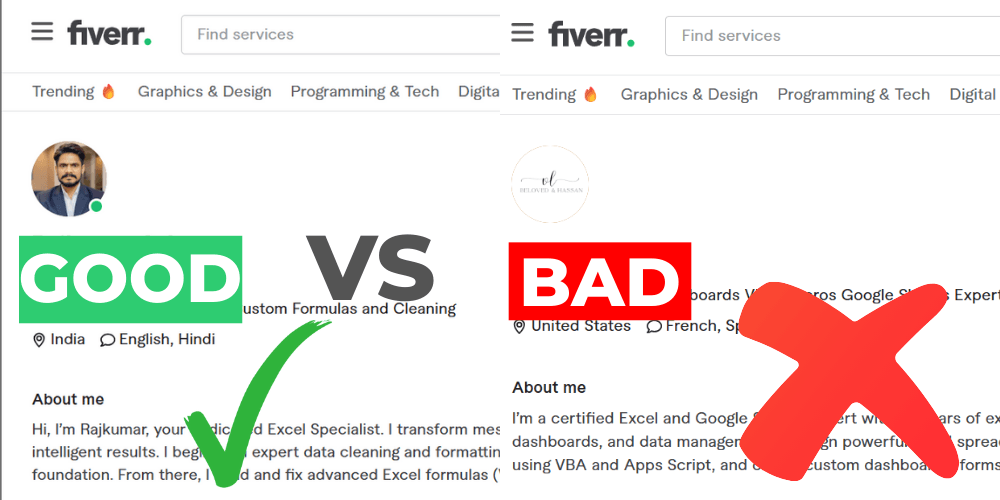
1. The “Anonymous” Profile Picture (Sabse Badi Galti)
Yeh one of the most common Fiverr profile mistakes hai.. Bahut se beginners sharam ke maare ya privacy ke chakkar mein apna face nahi dikhate. Woh flowers, God ki photo, ya koi random logo laga dete hain.
Why ignoring this is one of the biggest Fiverr profile mistakes:
Fiverr is a marketplace of trust. Jab koi gora client (US/UK) aapko $50 ya $100 pay karne wala hota hai, toh woh dekhna chahta hai ki “Who is this person?”
Agar aapki photo fake lagegi, toh client sochega aap scammer hain.
How to fix it:
- Real photo use karein: Ek clean background ke saath apni photo lagayein.
- Smile: A smiling face shows confidence and friendliness.
- No Selfies: Bathroom selfies ya heavy filters use na karein.
Pro Tip: Client ek insaan (human) ke saath kaam karna chahta hai, kisi logo ke saath nahi. Be real.
2. Writing a “Robotic” Description
Bahut log doosron ki profile copy-paste karte hain ya ChatGPT se likhwa kar daal dete hain. Example: “I am a hardworking passionate freelancer looking for work…”
Yeh padh kar client bore ho jata hai. Isme koi “Soul” nahi hoti.
Correction:
Write like a human being. Apni description mein thoda personality daalein. Batayein ki aap client ki help kaise kar sakte hain. “Me, Me, Me” ki jagah “You, You, You” par focus karein.
3. The “Jack of All Trades” (Sab Kuch Kar Lunga)
Profile tagline: “Expert in Logo Design, Data Entry, Python, Translation, and Voice Over.”
Jab client yeh dekhta hai, toh wo confuse ho jata hai. Koi bhi insaan in sab cheezon mein “Expert” nahi ho sakta. Isse aap “Desperate” lagte hain.
Fix: Niche down.
Agar aap Excel expert hain, toh sirf Excel aur Data services par focus karein. Specialist ko hamesha Generalist se zyada paise milte hain.
4. Ignoring Grammar and Spelling Errors
Agar aap “Content Writer” ya “Professional VA” hain, lekin aapki profile description mein spelling mistakes hain, toh client aap par trust kaise karega?
Poor English communication ek bada barrier ban jata hai.
Solution:
- Apna text Grammarly (free version) se check karein.
- Simple English likhein. Fancy words use karne ki zaroorat nahi hai, bas clear hona chahiye.
5. The “Empty” Story Line (One-Line Tagline)
Aapki profile photo ke neeche ek choti si line hoti hai. Bahut log isey khali chhod dete hain ya likhte hain “I am a freelancer.”
Yeh space aapka Digital Billboard hai. Isey waste mat karein.
Make it catchy:
- Bad: “Data Entry Operator”
- Good: “Your Go-To Expert for Excel Automation & Clean Data.”
6. Using a Fake Location (VPN Tricks)
Kuch naye freelancers sochte hain ki agar woh location “USA” set karenge VPN use karke, toh unhein zyada orders milenge.
Never do this.
Fiverr ka algorithm bahut smart hai. Jis din unhein pata chala (aur pata chal hi jata hai), aapka account permanently ban ho jayega. Be proud of being from India. Indian tech talent ki puri duniya mein respect hai.
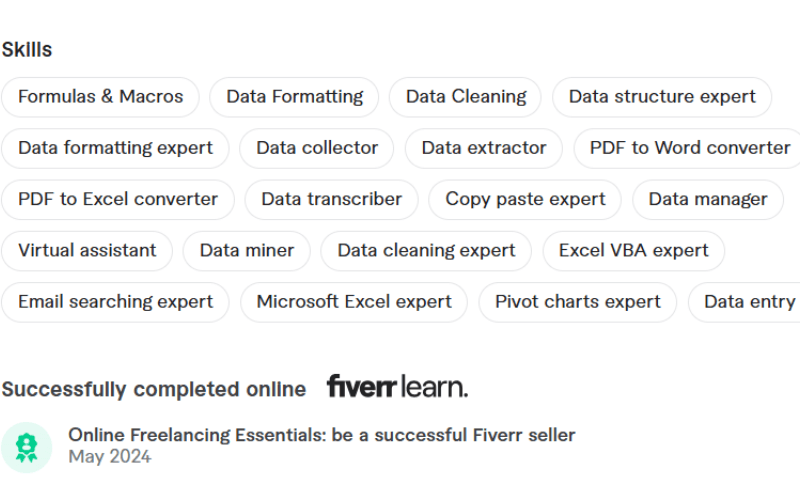
7. Not Taking Fiverr Skill Tests
Jab aap naye hote hain, toh aapke paas Reviews (Stars) nahi hote. Toh client aapki knowledge par trust kaise kare?
Fiverr free “Skill Tests” offer karta hai (English, SEO, WordPress, etc.).
Why you should do it:
Agar aap test pass karte hain, toh aapki profile par ek “Green Checkmark” aa jata hai. Yeh ek beginner ke liye “Social Proof” ka kaam karta hai.
8. Slow Response Time (App Use Na Karna)
Fiverr par “Speed is Money.”
Agar client ne message kiya aur aapne 10 ghante baad reply kiya, toh tab tak woh kisi aur ko hire kar chuka hoga.
My Personal Advice:
Fiverr mobile app hamesha phone mein rakhein. Koshish karein ki message aate hi 15-30 minutes ke andar reply karein. Fast response rate se aapki Gig ranking bhi boost hoti hai.
9. “Set It and Forget It” (Update Na Karna)
Jaisa maine bataya, “When I realized, I rectified these things and always updated my profile.“
Freelancing industry badal rahi hai.
- Agar aapne 2 saal pehle profile banayi thi, toh ho sakta hai aaj wo skills outdated ho gayi hon.
- Naye portfolio samples add karte rahein.
- Active profiles ko Fiverr algorithm zyada push karta hai.
10. Failing to handle “Difficult Clients” properly
Profile achi hone ke baad jab client aata hai, toh conversation bahut matter karti hai.
Kabhi-kabhi clients demanding hote hain. Agar aap gusse mein reply karenge, toh order cancel ho sakta hai aur bad review mil sakta hai. Aapko pata hona chahiye ki difficult situations ko professionally kaise handle karein.
Iske liye maine ek detailed guide banayi hai jisme exact scripts di gayi hain: 👉 Read Guide: Handle Difficult Clients on Fiverr (Scripts Included)
(Yeh article zaroor padhein, yeh aapki profile rating bacha sakta hai).
FAQ: Common Profile Doubts
Can I write my Fiverr profile description in Hindi?
Fiverr ek global platform hai, isliye Profile Description English mein hi honi chahiye. Agar aap Hindi mein likhenge, toh US/UK clients ko samajh nahi aayega. Haalaanki, aap “Languages” section mein “Hindi” zaroor add kar sakte hain.
What should I do if I don’t have a portfolio?
Aap “Dummy Projects” banayein. Example ke liye, agar aap Logo Designer hain, toh kisi imaginary company ke liye 5 logos design karein. Client ko “Work Quality” dekhni hoti hai, yeh matter nahi karta ki wo real client ka kaam tha ya practice work.
Does changing the profile picture affect Gig ranking?
Bilkul nahi. In fact, agar aap ek better quality aur professional photo lagate hain, toh aapka CTR (Click Through Rate) badh jata hai, jisse ranking improve hi hoti hai.
Conclusion
Freelancing mein “Jo dikhta hai, wahi bikta hai.”
Aapki profile aapka digital office hai. Agar ye messy ya fake lagega, toh client darwaze se hi wapas chala jayega. Aaj hi apni profile open karein aur in 10 points ko cross-check karein.
Ye choti changes aapke career mein bada jump la sakti hain.
Aapne inmein se kaunsi galti ki thi? Comment karke batayein!