Freelancing gives you freedom, but to manage it effectively, you need the right tools—specifically, free excel templates for freelancers that organize your business.
1. Daily To-Do List & Planner
A simple Daily Planner template helps you list your top 3-5 priorities for the day. Instead of trying to do everything at once, you assign specific tasks to specific time blocks.
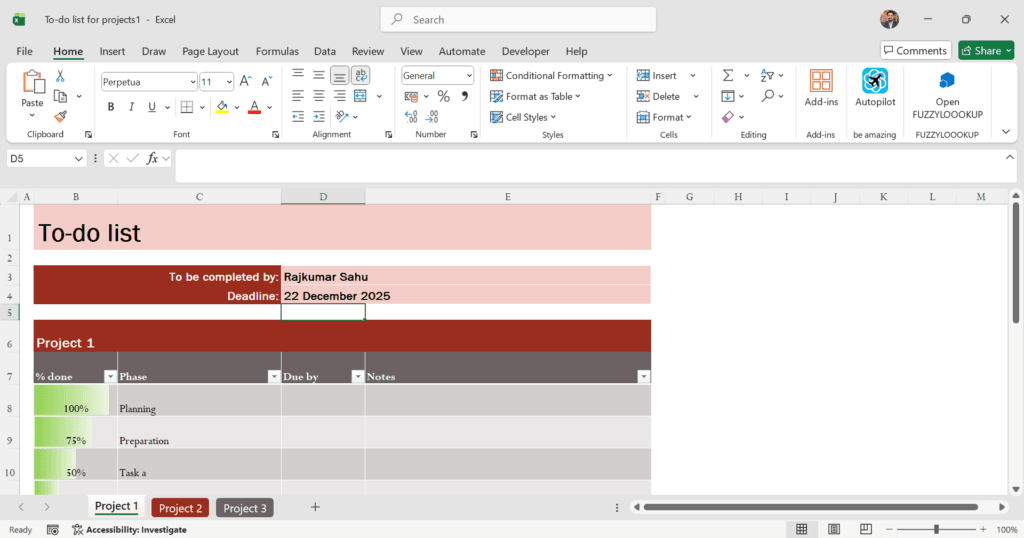
Why you need it:
- It prevents overwhelm by focusing on just 3 main tasks.
- It gives you a sense of accomplishment when you check off boxes.
- It keeps you grounded on days when you don’t get any new orders.
2. Professional Invoice Generator
Sending a text message saying “Please pay ₹5,000 via UPI” is not professional. Clients respect freelancers who send proper invoices. Your Excel invoice template should automatically calculate totals and include your bank details/UPI ID clearly at the bottom.
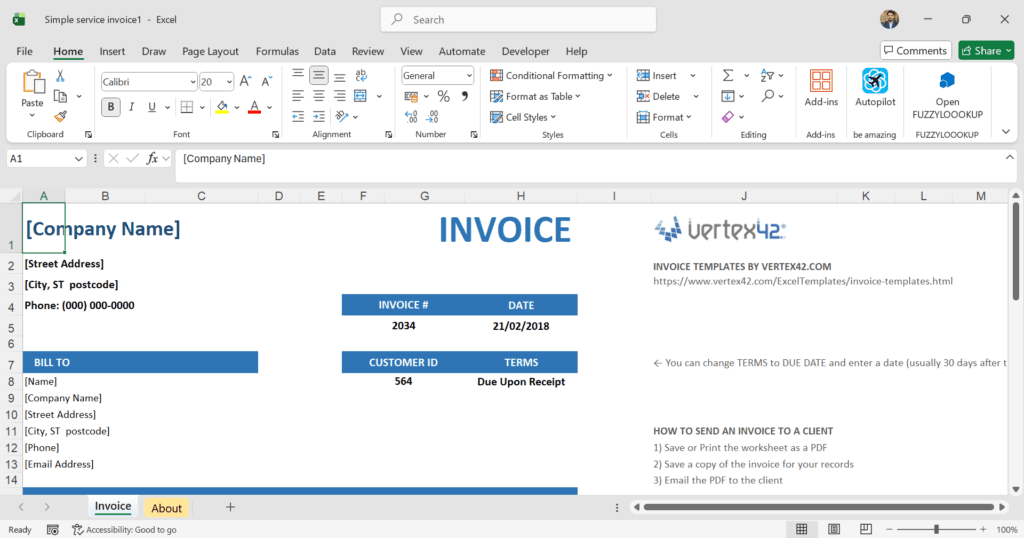
Pro Tip: Keeping accurate invoice records is your first line of defense if a project goes wrong. If you ever have to handle difficult clients on Fiverr or Upwork, having a paper trail of exactly what was billed and when is crucial. A clear invoice prevents 90% of arguments.
3. Freelance Expense Tracker (Indian Tax Ready)
Come March (financial year-end), most Indian freelancers panic. “Kahan gaya paisa?” (Where did the money go?). You need a simple sheet to log every business expense: internet bills, laptop repairs, domain hosting, or even that co-working space coffee.
Why you need it:
- Helps you calculate your actual profit (Income minus Expenses).
- Makes filing taxes (ITR) much easier.
4. Client CRM (Relationship Management)
You don’t need Salesforce. You just need a spreadsheet that lists: Client Name, Company Name, Contact Email, Last Project Date, and Notes (e.g., “Likes formal communication,” or “Always pays late”).
Why you need it:
- It helps you follow up. If you haven’t heard from a client in 3 months, check your CRM and send a “Hello” email. This is the easiest way to get repeat work.
5. Social Media Content Calendar
If you are marketing yourself on LinkedIn, Instagram, or Twitter (X), you cannot post “whenever you feel like it.” A content calendar template helps you plan your posts for the week or month ahead. Columns should include: Date, Platform, Post Topic, Status (Drafting/Posted), and Link.
6. Project Timeline (Gantt Chart)
When you land a big project, regular to-do lists aren’t enough. You need a Timeline or Gantt chart to show the client when you will deliver what.
Example columns: Task Name (e.g., “Website Design Draft”), Start Date, End Date, Status (%). Sharing this with a client makes you look like a pro agency, not just a solo freelancer.
7. Hourly Time Sheet
Even if you charge per project, you should track your hours. Why? Because you might realize that a ₹2,000 logo design actually took you 20 hours (earning you only ₹100/hour!). Use a time sheet to track Start Time, End Time, and Task Description.
8. Password & Login Manager (Offline)
Note: Do not put banking passwords here. As a freelancer, you will have logins for Canva, Fiverr, Upwork, Freepik, WordPress, Hosting, and 10 other tools. Keep a secured, offline Excel sheet (password protected) so you don’t waste time resetting them every week.
⚠️ Security Warning: Do not download a template for this. Action: Open a blank Excel sheet, name columns “Site,” “Username,” and “Password,” and save it with a Password Lock (File > Info > Protect Workbook).
9. Annual Income vs. Goal Tracker
This is the “Big Picture” sheet.
- Column A: Month (Jan-Dec)
- Column B: Income Goal (e.g., ₹50,000)
- Column C: Actual Income
- Column D: Difference (+/-)
Seeing that you are hitting (or missing) your goals helps you adjust your strategy. If you are behind target in June, you know you need to pitch more in July.
10. Subscription Tracker
We all sign up for free trials and forget to cancel. A subscription tracker lists every tool you pay for (Zoom, Microsoft 365, Adobe, etc.) and the renewal date. This prevents those surprise credit card deductions.
How to Organize These in Google Sheets
You don’t need 10 separate files cluttering your drive.
- The Master Sheet Method: Create one Google Sheet called “Freelance OS 2026.”
- Use Tabs: Create tabs at the bottom for each template (e.g., Tab 1: Tracker, Tab 2: Invoicing, Tab 3: CRM).
- Bookmark It: Save this sheet to your browser’s bookmark bar so it’s the first thing you open every morning.
Frequently Asked Questions (FAQ)
Q: Where can I get these free Excel templates for freelancers?
You can create them yourself using the headers I mentioned above, or download the professionally curated versions linked in the list above.
Q: Is Google Sheets better than Excel for freelancing?
For collaboration and safety, yes. Google Sheets saves automatically to the cloud. If your laptop crashes, you don’t lose your data. Plus, you can share a “View Only” link of a project timeline with your client easily.
Q: Do I need to know advanced Excel formulas?
Bilkul nahi (Not at all). Basic formulas like =SUM() to add up your earnings and simple subtraction for expenses are all you need. You don’t need to be an Excel expert to be an organized freelancer.
Conclusion: Start Your Chain Today
Freelancing is a marathon, not a sprint. The freelancers who burn out are usually the ones who are disorganized. By using these free excel templates for freelancers, you remove the mental load of “remembering things” and focus on doing great work.
My advice? Start with the Daily To-Do List (#1). Build the habit of planning your day the night before. Everything else will follow.
Want more freelancing tips and tools? Scroll down and sign up for the FreelanceSheet newsletter. I share weekly advice on how to grow your income on Fiverr and Upwork, straight to your inbox.