We have all been there. You finish a project, send your invoice tracker excel file, and feel great. The client is happy. You mark the task as “Done” in your mind.
But two weeks later, you wake up with a sinking feeling. “Wait, did I send the invoice for that logo design?” Or worse, “Did that client actually pay me, or did I just forget to check?”
I have lost money this way. I remember clearly—early in my freelancing career, I did a project worth $150. It wasn’t a huge amount, but for a student, it was a lot. I delivered the work, got busy with exams, and completely forgot to track the payment date.
By the time I remembered, 45 days had passed. It felt awkward to ask for payment so late. I didn’t know the exact date I was supposed to remind them. That confusion cost me money and peace of mind.
If you are managing your freelance business using sticky notes, a paper diary, or just your memory, you are leaving money on the table.
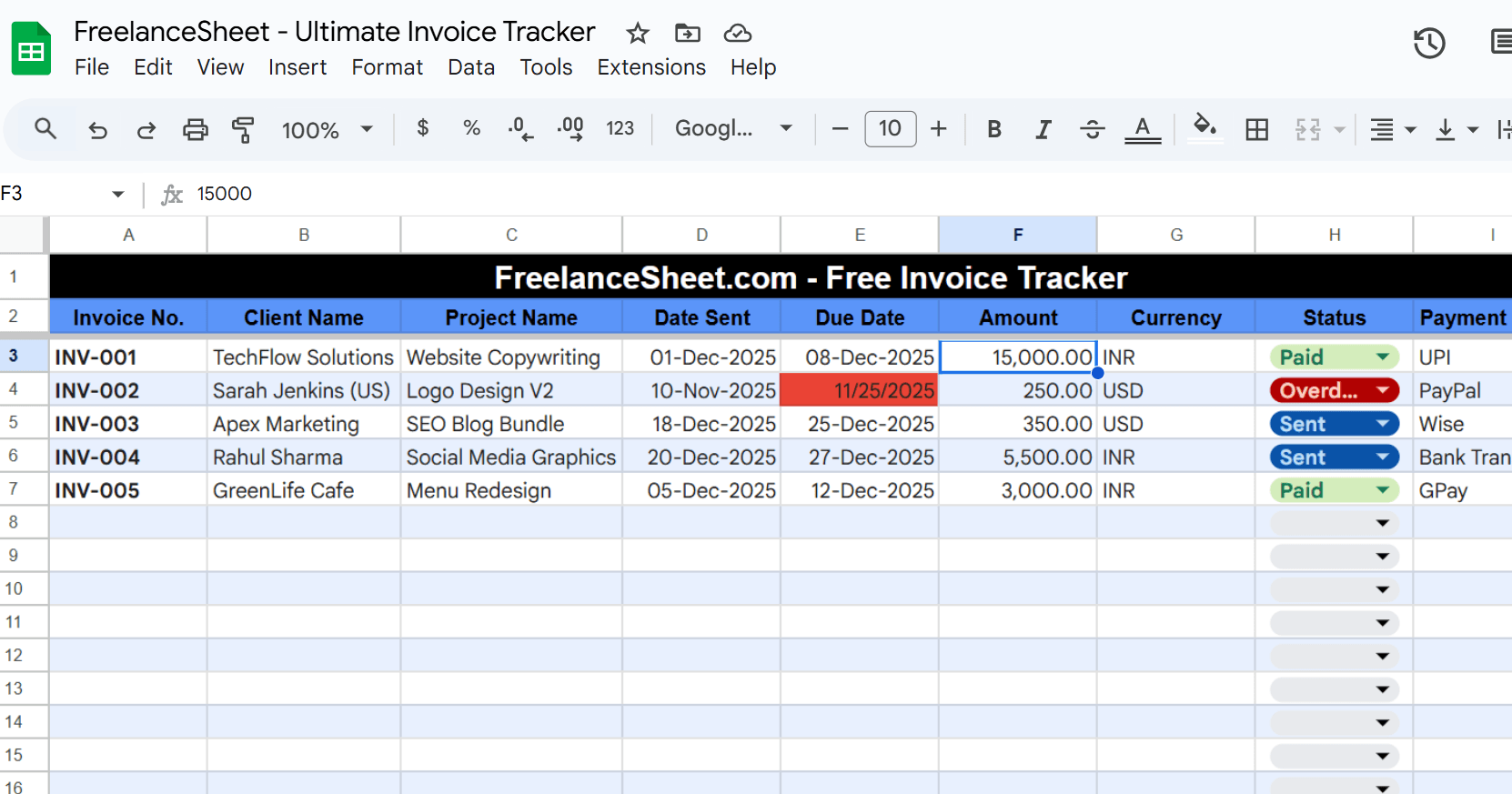
In this guide, I will show you how to build a simple, automated invoice tracker excel system that does the remembering for you. Plus, I’ll share my personal template (Free Download) that turns red when a client is late!
Why You Need an Invoice Tracker Excel (Not Just a Notebook)
Many beginners in India start by writing their earnings in a notebook. “Client A: ₹5,000 – Paid.”
This works when you have one client. But what happens when:
- You have 5 clients with different due dates?
- One client pays in USD (PayPal) and another in INR (UPI)?
- A client asks for “Net-30” payment terms (payment after 30 days)?
A notebook cannot alert you when a date has passed. A notebook cannot calculate your total pending amount instantly.
As a freelancer, your goal is not just to work; it is to get paid. An automated spreadsheet acts like a personal accountant. It tells you exactly who owes you money and when you need to send a polite reminder email.
The “Forgotten Invoice” Cost
If you forget to follow up on an invoice by just 3 days, your chances of getting paid instantly drop. Clients get busy. If you aren’t on top of their inbox, you fall to the bottom of their to-do list.
A proper payment tracking system removes the awkwardness. You don’t have to “feel” like it’s time to ask for money; the sheet tells you it is time.
How to Build a Smart Invoice Tracker Excel Sheet
You don’t need to be an Excel wizard to build this. You just need a few columns and one special “conditional formatting” trick.
If you want to build your own, open a blank Excel sheet or Google Sheet and create these headers:
- Invoice Number: (Always number them! INV-001, INV-002).
- Client Name: The person or company name.
- Project Name: e.g., “Website Content Writing.”
- Date Sent: The day you emailed the invoice.
- Due Date: The day the money must be in your bank.
- Amount: The value (Make sure to note if it is USD or INR).
- Status: This is crucial. Use a dropdown for: Sent, Paid, Overdue.
Adding the “Red Alert” Magic
This is the most important part of the invoice tracker excel setup. We want the “Due Date” cell to turn RED automatically if the date has passed and you haven’t been paid yet.
How to do it manually:
- Select your “Due Date” column.
- Go to Format > Conditional Formatting.
- Set the rule: “Format cells if… Date is before… Today.”
- Choose the color Red.
Now, whenever you open your sheet, if a date is red, you know you have work to do. No more guessing, no more forgetting.
Handling Multi-Currency (USD & INR)
For Indian freelancers, this is a major headache. You might earn $50 on Fiverr and ₹5,000 from a local client.
In my tracker, I separate these. I have a column for “Currency Type.” This helps me see at a glance how many Dollars are stuck in PayPal and how many Rupees are pending via UPI. This clarity helps you plan your monthly budget better.
Features of the Free FreelanceSheet Tracker
I know setting up Excel formulas can be boring. You want to focus on your work, not on coding spreadsheets.
That is why I created the FreelanceSheet Ultimate Invoice Tracker. I use this exact sheet for my own projects. It is designed specifically for the needs of Indian freelancers.
Here is what makes this sheet special:
- Auto-Red Alerts: As I mentioned, if the due date passes, the cell glows red. You can’t miss it.
- USD & INR Ready: Whether you are working with US clients or local Indian brands, the sheet handles both currencies.
- Status Dropdowns: Simple “Paid,” “Pending,” and “Overdue” options to keep things clean.
- Monthly Totals: It automatically sums up how much you earned this month so you can track your income growth.
Get the Sheet:
Common Mistakes in Freelance Invoicing
Even with a great tracker, you can make mistakes that delay your payment. Here are a few I learned the hard way:
1. Not Agreeing on a Due Date
Never send an invoice without a due date. If you just send it, the client might think they can pay whenever they want. Always state: “Payment due within 7 days” or “Due on receipt.”
2. Being Afraid to Remind the Client
Many of us feel shy asking for money. We think the client will get angry. But remember, this is business. If you have delivered the work, you deserve to be paid.
However, sometimes a client isn’t just forgetful—they are difficult. They might ignore your emails or make endless excuses. If you are facing a situation where a client is ghosting you or refusing to pay, you need a different strategy.
Read this next: If polite reminders aren’t working, check out my guide on how to handle difficult clients on Fiverr and other platforms. It includes scripts you can copy-paste to get paid without fighting.
3. Forgetting to Check the Sheet
The best tool in the world is useless if you don’t open it. Make it a habit: Every Friday morning, open your invoice tracker excel sheet. Check for any red dates. Send your follow-up emails immediately.
FAQ: Invoice Tracking for Beginners
Q1: Is Excel better than paid software like QuickBooks?
For beginners? Absolutely. Tools like QuickBooks or FreshBooks are powerful, but they cost money. When you are just starting, keep your expenses zero. An invoice tracker excel sheet is free, customizable, and perfect for managing 1-10 clients.
Q2: What if a client pays late? Should I charge a fee?
You can, but you must mention this in your initial contract. “A 5% late fee applies after 30 days.” If you didn’t agree to it beforehand, you can’t surprise them with it later.
Q3: Can I use this on my phone?
Yes! Since this invoice tracker excel template is cloud-friendly, you can open it using the Google Sheets app and update your payments directly from your phone.
Conclusion
Admin work is boring. Nobody starts freelancing because they love filling out spreadsheets. But remember my story about the lost $150?
Using a professional invoice tracker excel sheet acts as that discipline. It separates a ‘hobby freelancer’ from a ‘professional business owner’.
Stop relying on your memory. Stop hoping clients will remember to pay you. Take control of your income today. Download the free invoice tracker excel file below and never lose another dollar.